Modovisa Analytics. This page is ready
Modovisa Analytics

Enable Real Time visitor journey tracking by enabling the Modovisa Shopify App.
- 1
Get your tracking token
Sign in at modovisa.com and copy your Tracking token for this store (from Account → Tracked Sites page or the Installation page).
OR
- Sign up at modovisa.com
- Setup your Tracking Token for this store.
- Copy the Tracking token from the Account → Tracked Sites page or the Installation page.
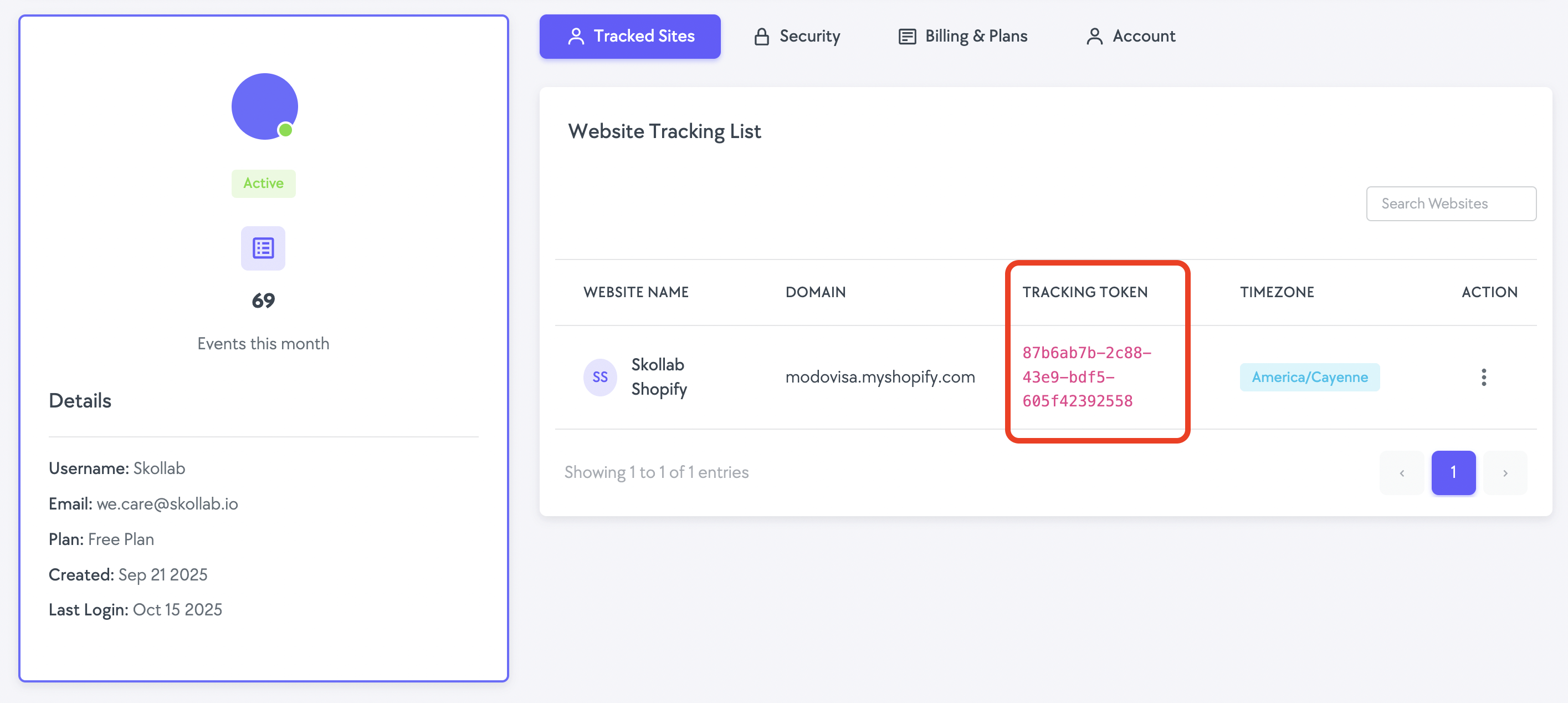
- 2
Enable the Modovisa App Embed
Click the button below. In the Theme editor, toggle Modovisa Embed ON, paste your token into “Modovisa tracking token”, then click Save.
 Tip: The field help text reads “Paste from modovisa.com → Account → Tracked Sites”.
 - 3
Verify it’s working
Visit your storefront in another tab to generate activity. Events should begin appearing on your Modovisa Live Insights page.
You can also confirm your Shopify Web Pixel connection is connected below.
Quick checklist
- Toggle Modovisa Embed ON, paste the tracking token, and Save.
- Visit your storefront to generate live events.
- Check your Modovisa Live Insights page for real-time activity.